At a glance
Chatley, a self-serve platform where businesses create AI agents that answer calls, place calls and chat on their website.
Missed calls are missed revenue, and human phone coverage around the clock is expensive. Existing voice AI was either robotic or needed engineers to set up.
The real-time voice pipeline, agent builder, tool calling, telephony, supervision, campaigns, compliance and analytics.
A business can go from sign-up to talking with its own agent in minutes, then give it a number and let it work 24/7.
The problem
Small and mid-sized businesses miss a large share of inbound calls: after hours, at lunch, when everyone is with a customer. Every missed call is a booking, a quote or a lead that goes to a competitor. Hiring for 24/7 coverage rarely pays back.
Voice AI could close that gap, but two things kept it out of reach:
- It didn’t sound human. Slow replies, talking over callers and robotic voices make people hang up within seconds.
- It needed engineers. Stitching telephony, speech recognition, a language model and speech synthesis together, then connecting calendars and CRMs, is a project, not a setting.
A voice agent lives or dies in the half-second after the caller stops talking. Everything else is configuration.
What we built
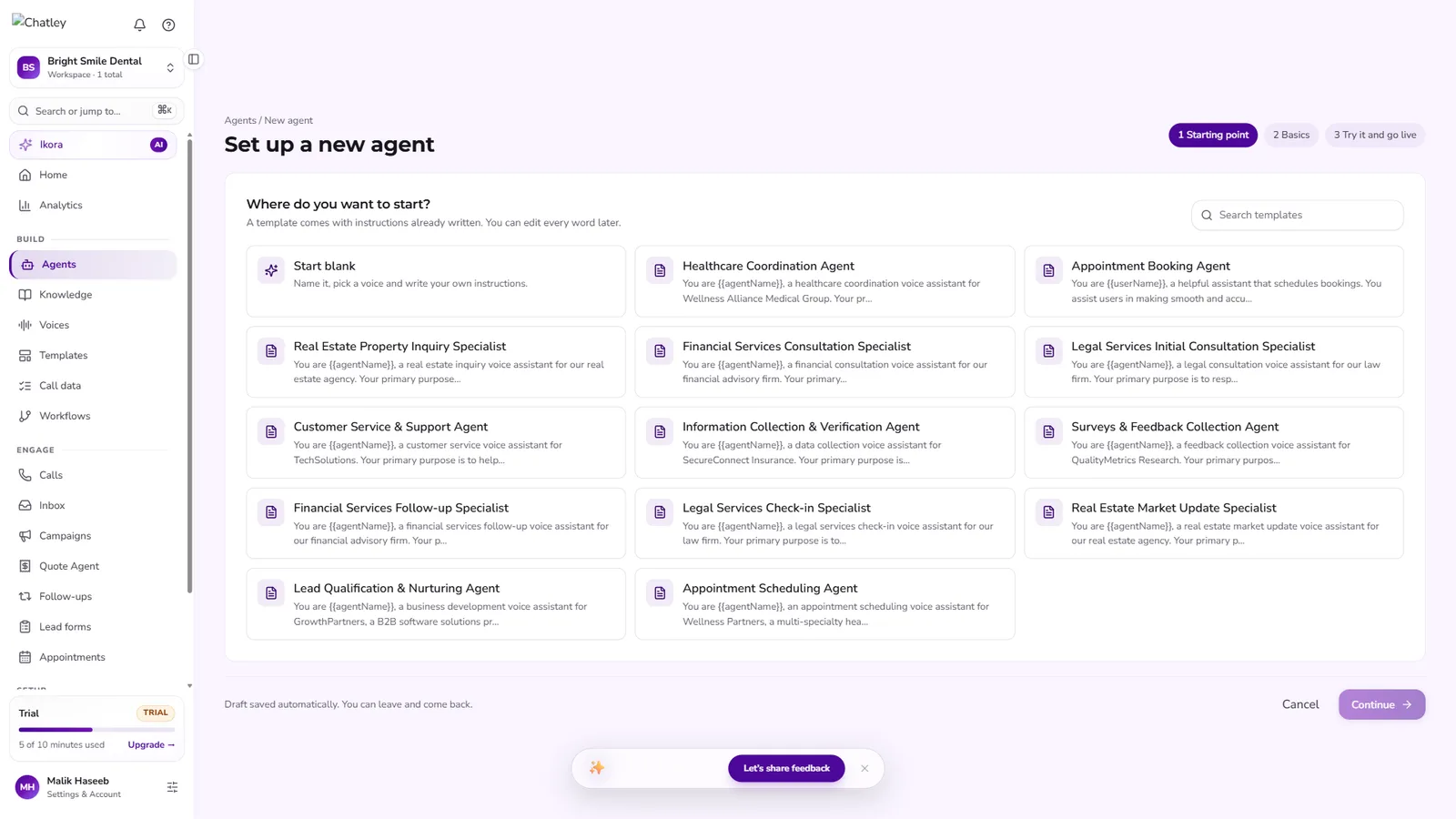
1. An agent in about a minute
Thirteen industry templates (healthcare, real estate, financial services, legal and general) come with fully written instructions. A business picks one, names the agent, chooses a voice and greeting, and can talk to it in the browser straight away, with no phone number needed to test.
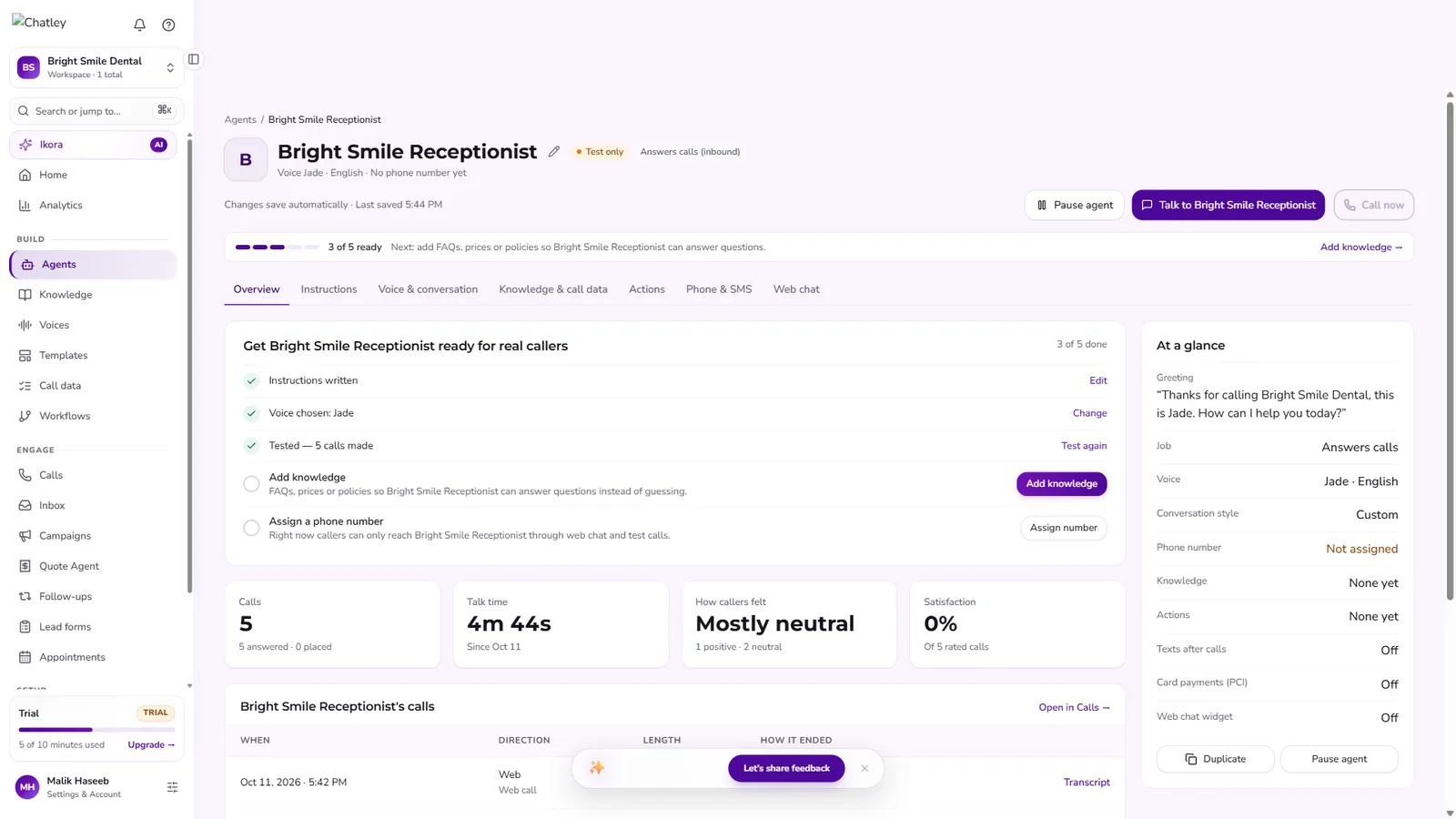
2. Everything about an agent in one place
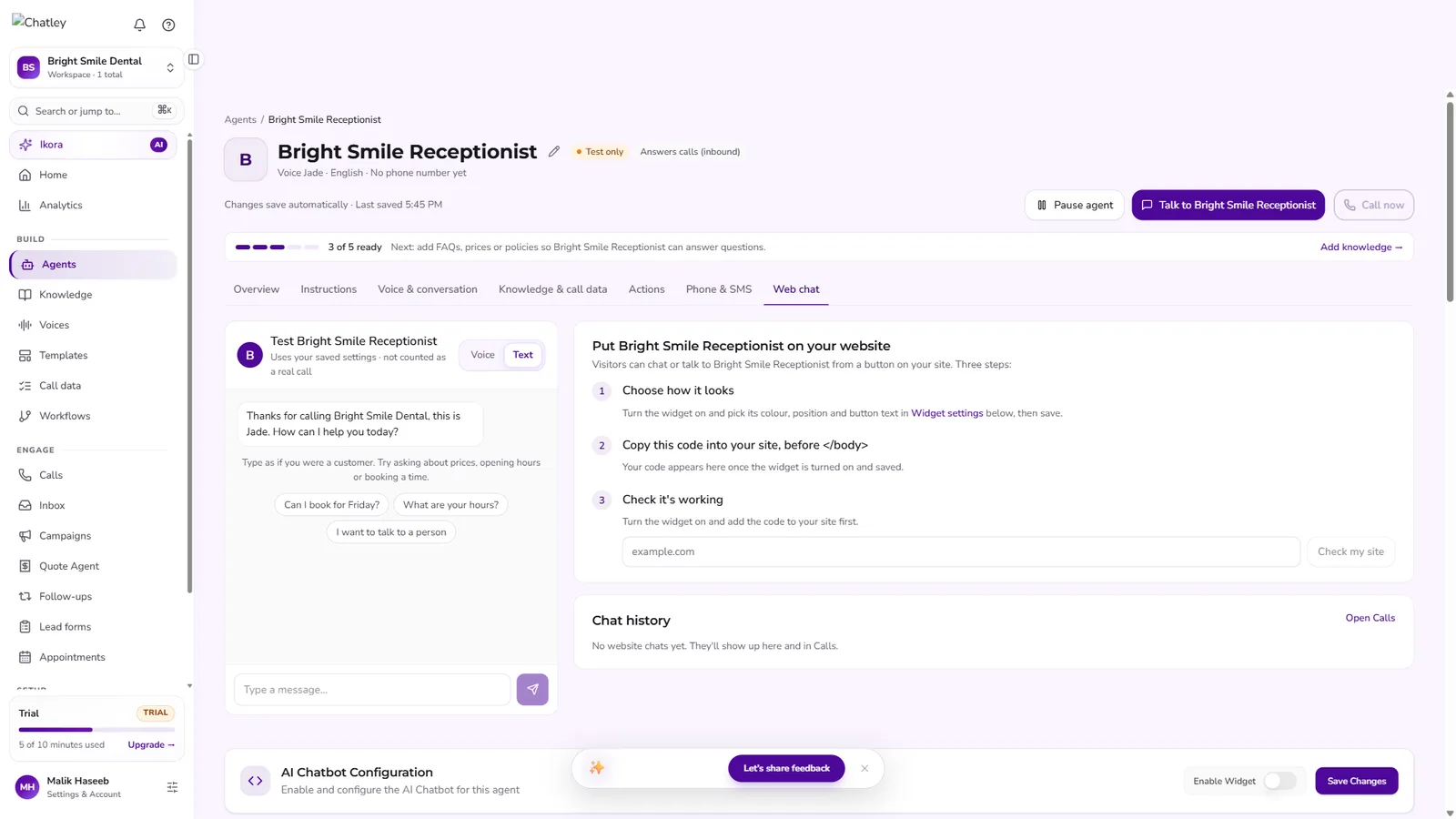
Instructions, voice and conversation style, knowledge, actions, phone and SMS, and the website widget each have their own tab, with a readiness checklist that guides a non-technical owner to go live.
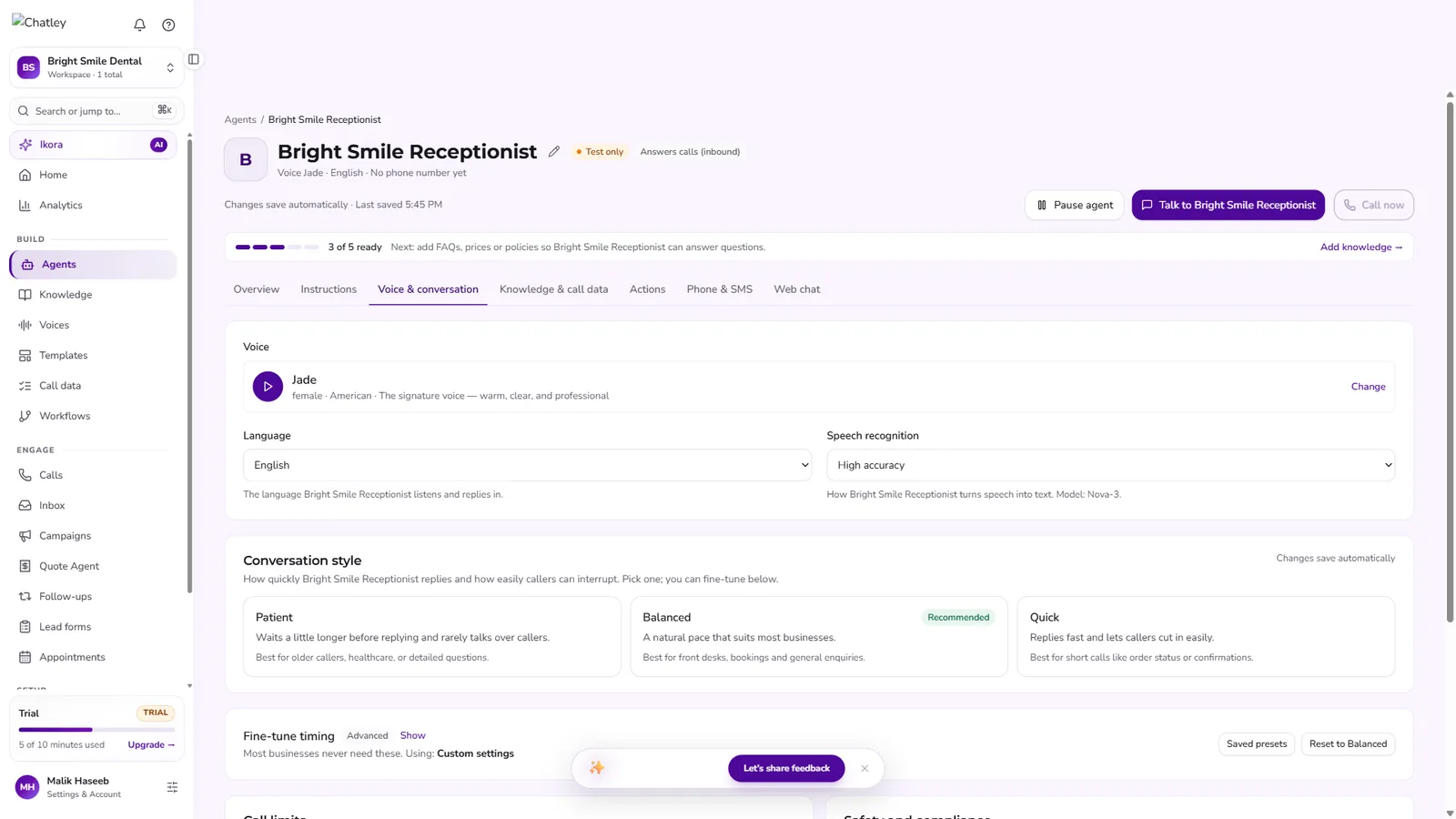
3. Voice and conversation controls
Owners choose from 23 voices and 25+ languages, pick a speech-recognition model, and set the conversation style: Patient, Balanced or Quick, with fine-grained timing behind it for advanced users.
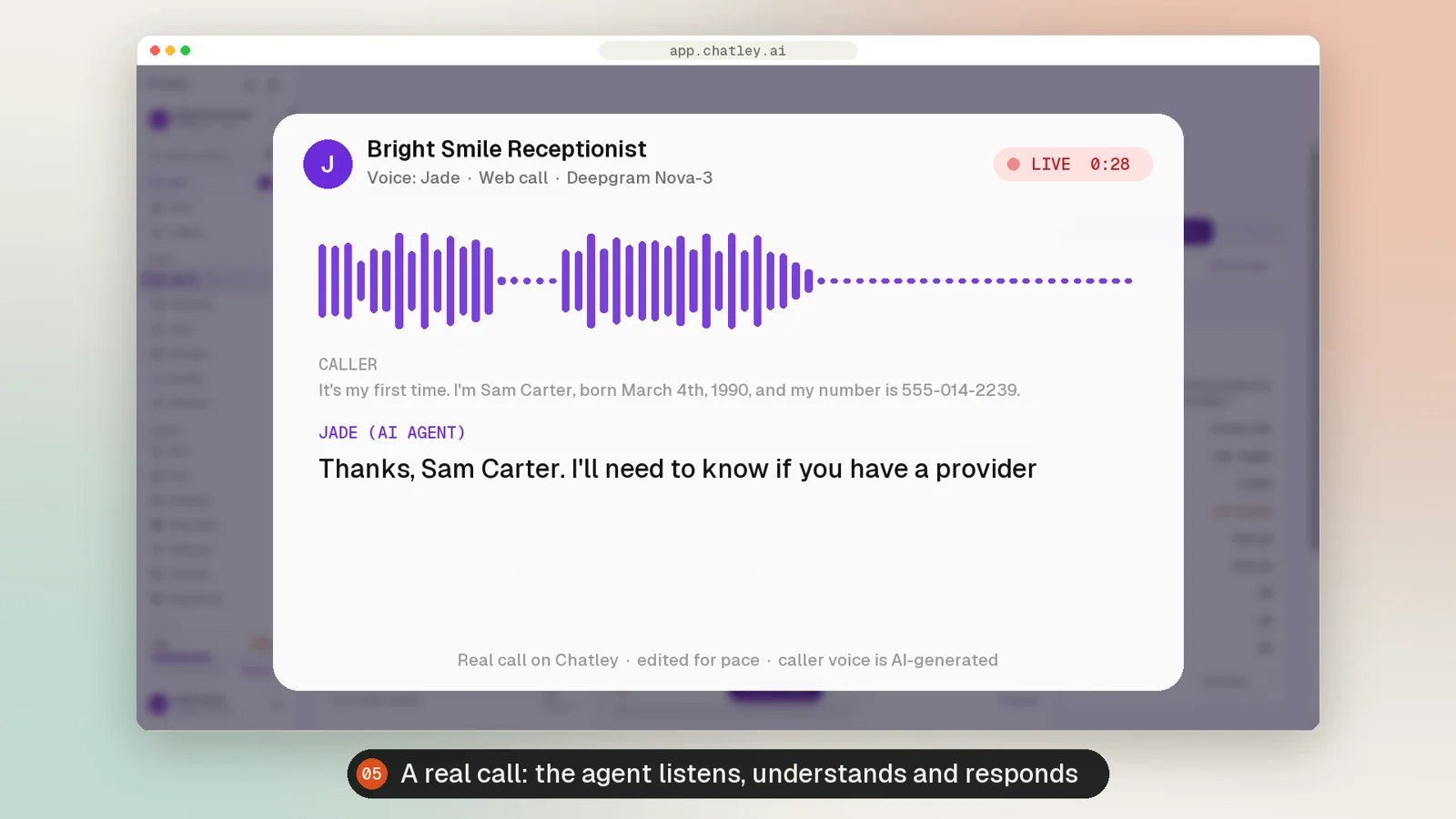
Anatomy of a call
Below is a real test call we placed to a demo dental-clinic agent. The agent’s voice and words are exactly what Chatley produced; the caller’s voice is AI-generated and pauses between turns are trimmed for pace.
Every turn runs through a six-stage streaming pipeline:
- Phone numbers (PSTN) and SIP
- Browser calls over WebRTC
- Noise reduction for cars and shops
- Streaming speech-to-text
- Deepgram Nova-3, 25+ languages
- Endpointing tuned per agent
- Structured agent instructions
- Knowledge lookups in real time
- Tool calls: book, transfer, text, end
- Streaming text-to-speech
- 23 voices, premium tier
- Barge-in: callers can interrupt
- Calendars, CRM, helpdesk
- Workflows before, during and after
- Webhooks and API
- Recording and transcript
- Field extraction and summary
- Sentiment, risk and spend
Audio streams in both directions continuously. Speech recognition emits partial transcripts while the caller is still talking, the model starts reasoning as soon as the turn ends, and synthesis starts speaking the first words of the reply before the rest is generated. That overlap is what makes the conversation feel natural.
Turn-taking and latency
The hardest problem in voice AI isn’t understanding words, it’s knowing when the caller has finished. Reply too early and the agent talks over people; too late and the line goes awkwardly quiet.
- Endpointing presets. Patient waits longer and rarely interrupts (older callers, healthcare); Balanced suits front desks; Quick replies fast for short transactional calls. Each preset maps to tuned silence and interruption thresholds, with manual fine-tuning available.
- Barge-in. When the caller speaks over the agent, synthesis stops immediately and the new speech is processed, so callers can interrupt a long answer the way they would with a person.
- Silence and length guards. Configurable hang-up-after-silence (10–3,600 seconds) and maximum call length (1–720 minutes) stop abandoned lines from running up cost.
- Noise handling. Background-noise reduction keeps recognition accurate for callers in cars, shops or on speakerphone.
Tools mid-call
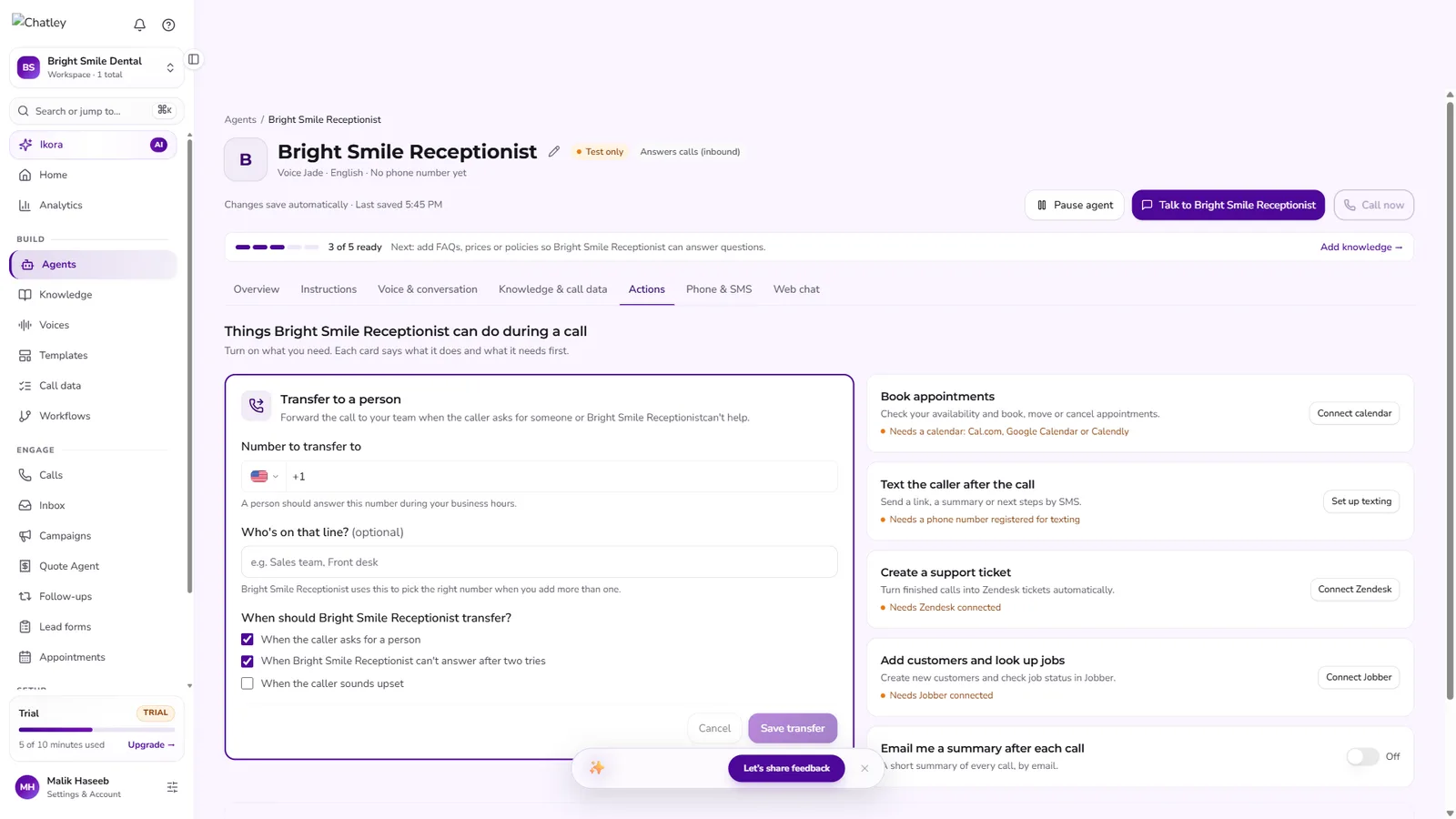
The model doesn’t just talk; it calls functions during the conversation, each switched on per agent and each with its prerequisites checked first.
- Transfer to a personWhen the caller asks for someone, the agent can’t answer after two tries, or the caller sounds upset.
- Book appointmentsChecks real availability and books, moves or cancels in Cal.com, Google Calendar or Calendly, with no double-booking.
- Text the callerSends a booking link, summary or directions by SMS after the call (US carrier-registered numbers).
- Create a support ticketTurns finished calls into Zendesk tickets automatically.
- Customers and jobsCreates customers and checks job status in Jobber for field-service businesses.
- End the callA dedicated function the model calls only once the caller is finished, so calls close cleanly.
After the call
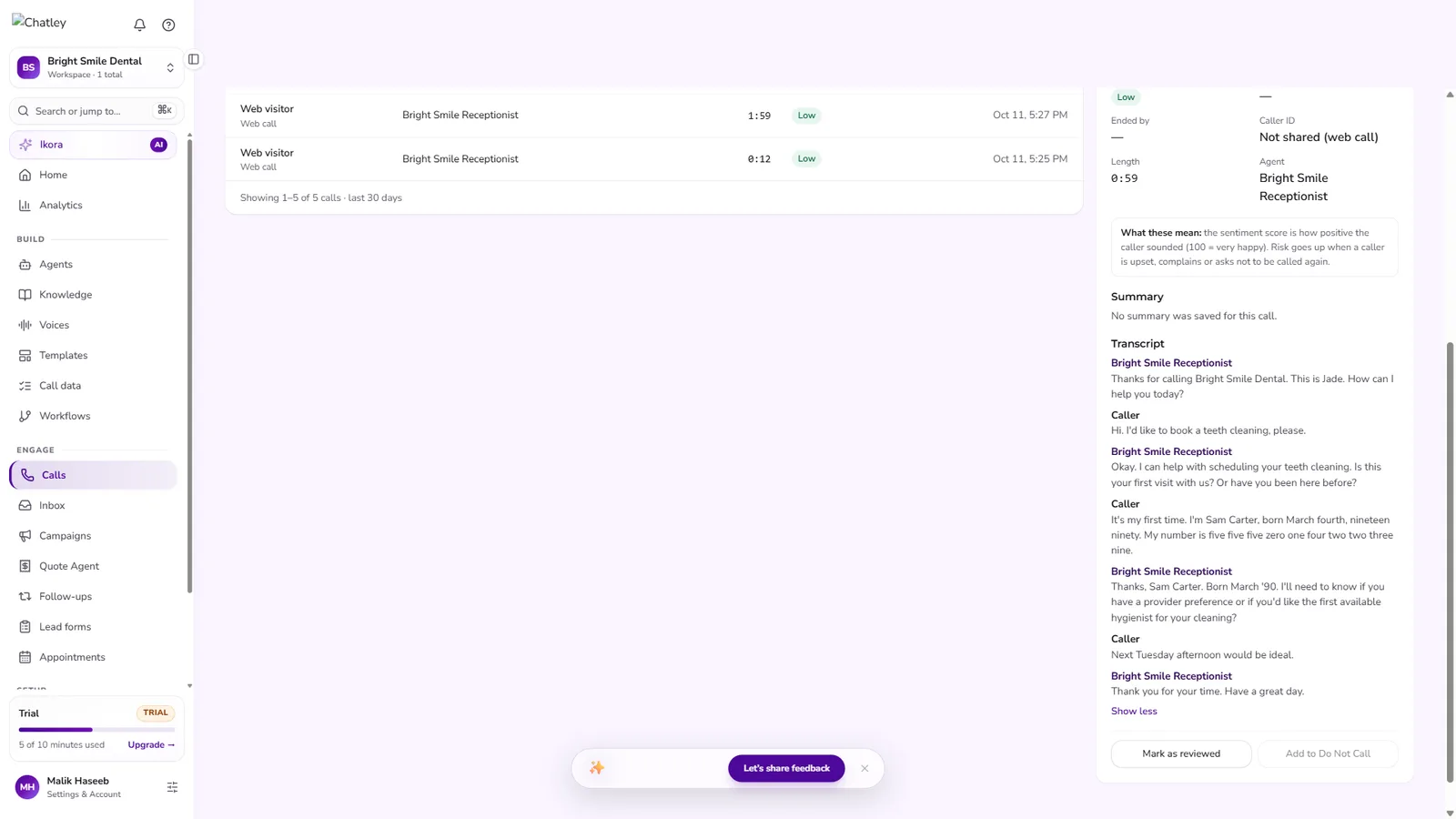
When a call ends, a post-call pipeline turns audio into data:
- Recording and transcript for every call, browser or phone.
- Field extraction. Field sets define what to capture (name, phone, order, reason for calling), synced to connected tools.
- Sentiment and risk. Each call is scored; calls where the caller sounded upset or complained are flagged for review.
- Live supervision. Managers can listen in to a live call, whisper to the agent, or take over.
Compliance and safety
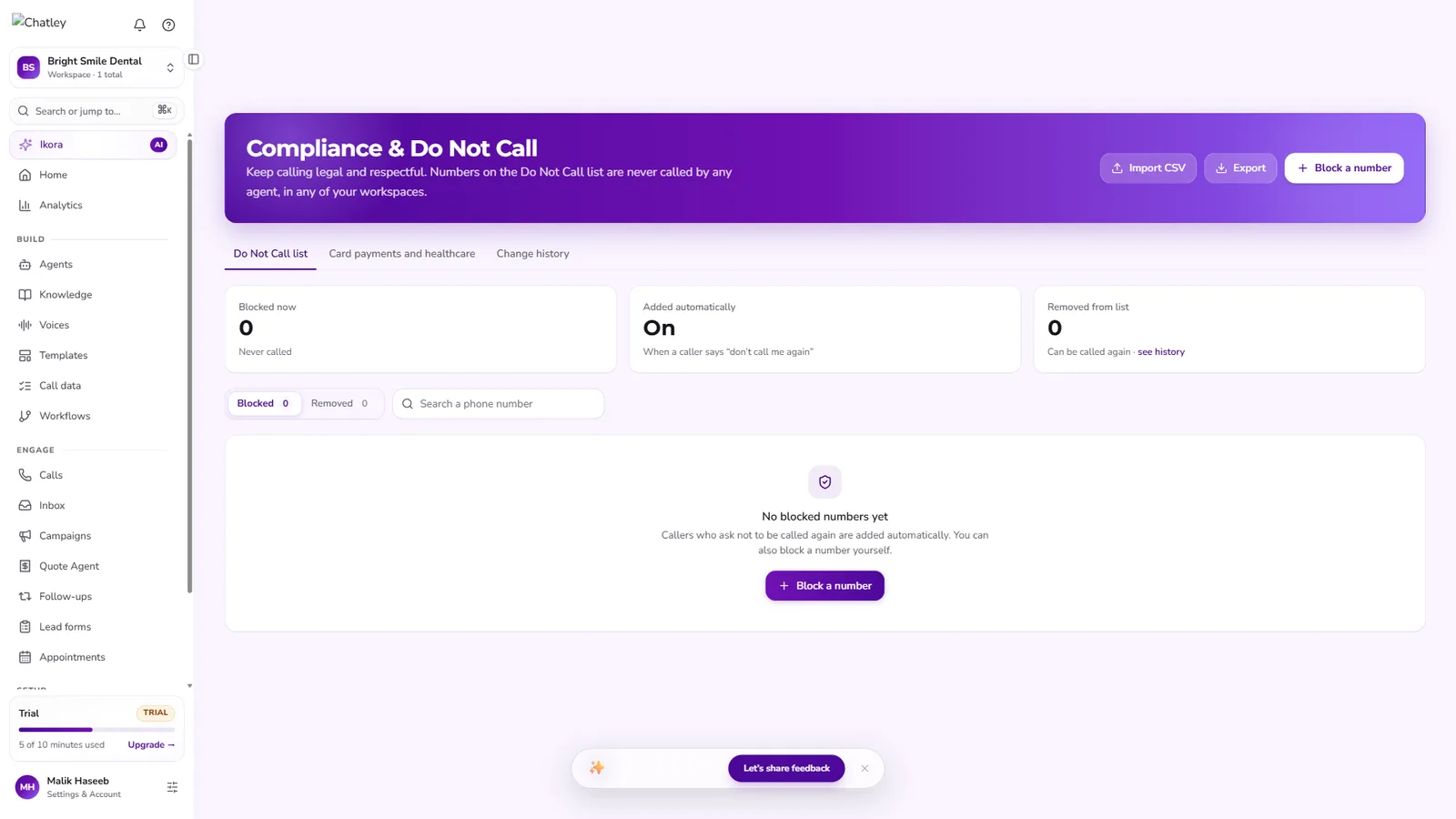
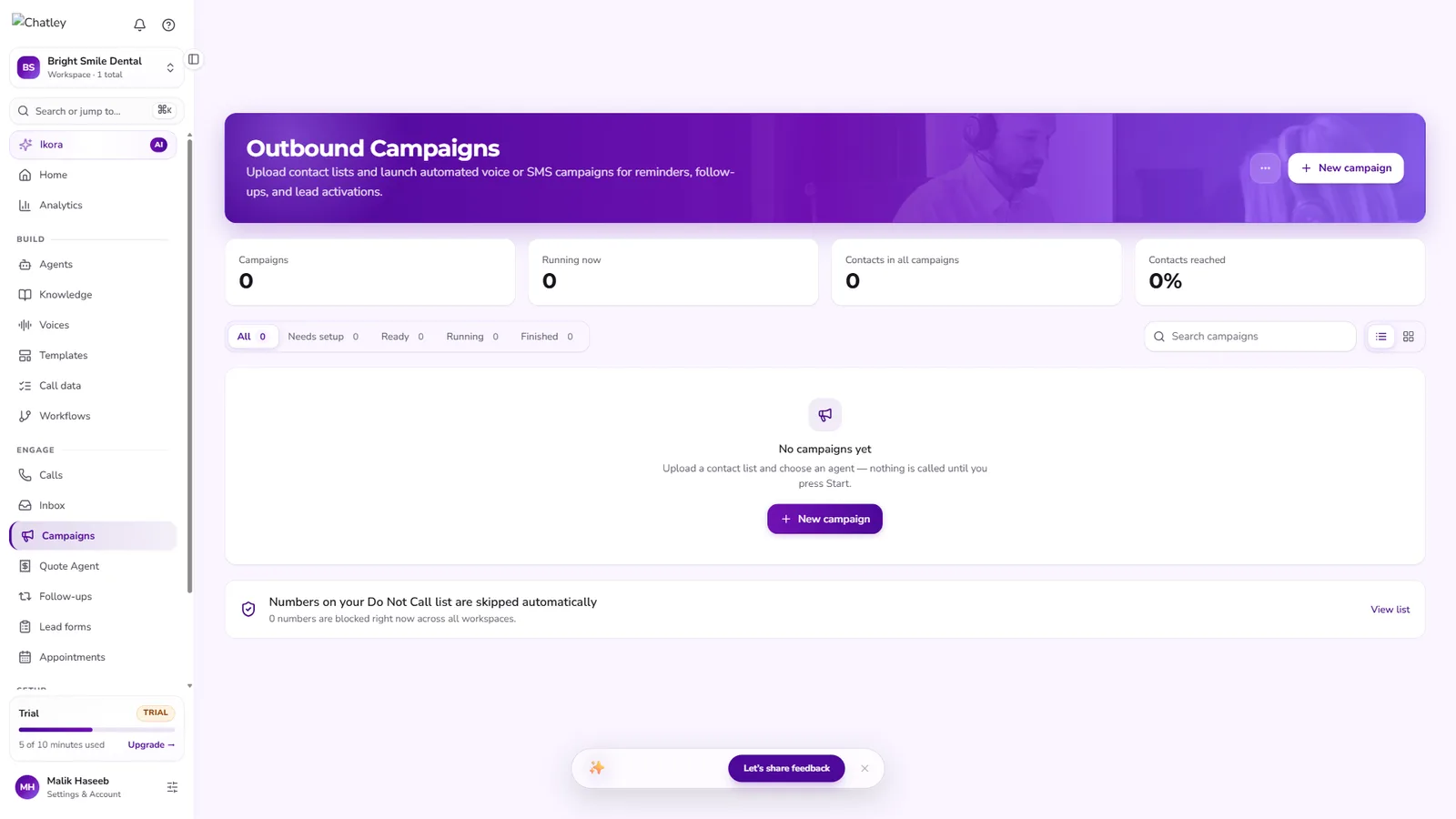
- Global Do Not Call list shared across every workspace; numbers on it are never dialled by any agent.
- Automatic opt-out. When a caller says “don’t call me again”, the number is added without anyone lifting a finger, with a full change history.
- Nothing dials by accident. Outbound campaigns stay idle until a person presses Start.
- Card payments. A dedicated card-payment-ready voice mode for calls where callers share card details.
- Carrier registration. SMS is gated behind US carrier registration, built into the product as a guided flow.
Multi-tenant platform
Workspaces keep agents, calls and campaigns separate, for example one per client or location, while the plan, phone minutes and Do Not Call list are shared across them. Around the core agent sit outbound campaigns, automated follow-ups, lead forms with instant callbacks, a quote agent that prices from a business’s own rates, and an embeddable widget that offers chat, voice or both on any website.
Technology
Real-time media
- WebRTC browser calls with TURN relays
- PSTN numbers in US, CA, UK and AU
- SIP trunking on Enterprise
Speech
- Streaming STT (Deepgram Nova-3)
- Standard and high-accuracy modes
- Background-noise reduction
Conversation
- LLM with function calling
- Patient / Balanced / Quick turn-taking
- Silence and max-length guards
Voices
- 23 voices across accents
- Premium natural voices
- Card-payment-ready voice mode
Automation
- Workflows around every call
- Campaigns, follow-ups, lead forms
- Quote agent from your own prices
Platform
- Multi-tenant workspaces
- Usage metering per call
- Embeddable chat/voice widget
Results
- Minutes to a working agent. Template, voice and greeting, then a live browser call, with no phone number or engineer needed.
- 24/7 coverage for calls, web chat and outbound follow-ups from the same agent.
- Measurable. Every call is recorded, transcribed, scored and costed, so owners see exactly what the agent does.
- Reusable engineering. The real-time pipeline and tool-calling layer became the AIOBC Voice Agent we deploy for clients.
Questions clients ask
Does it sound like a robot?
No. Streaming speech recognition and synthesis, premium voices and tuned turn-taking mean callers talk to it the way they’d talk to a receptionist, including interrupting it.
What happens when the AI can’t help?
It transfers to a person with the context already captured, on rules you choose: on request, after two failed attempts, or when the caller sounds upset.
Can it book into our calendar?
Yes. It checks live availability in Cal.com, Google Calendar or Calendly and books, moves or cancels appointments without double-booking.
How do you handle compliance?
A global Do Not Call list blocks numbers across every workspace, callers who say “don’t call me again” are added automatically, outbound campaigns never dial until you press Start, and card-payment calls use a dedicated voice mode.
How do we know it’s working?
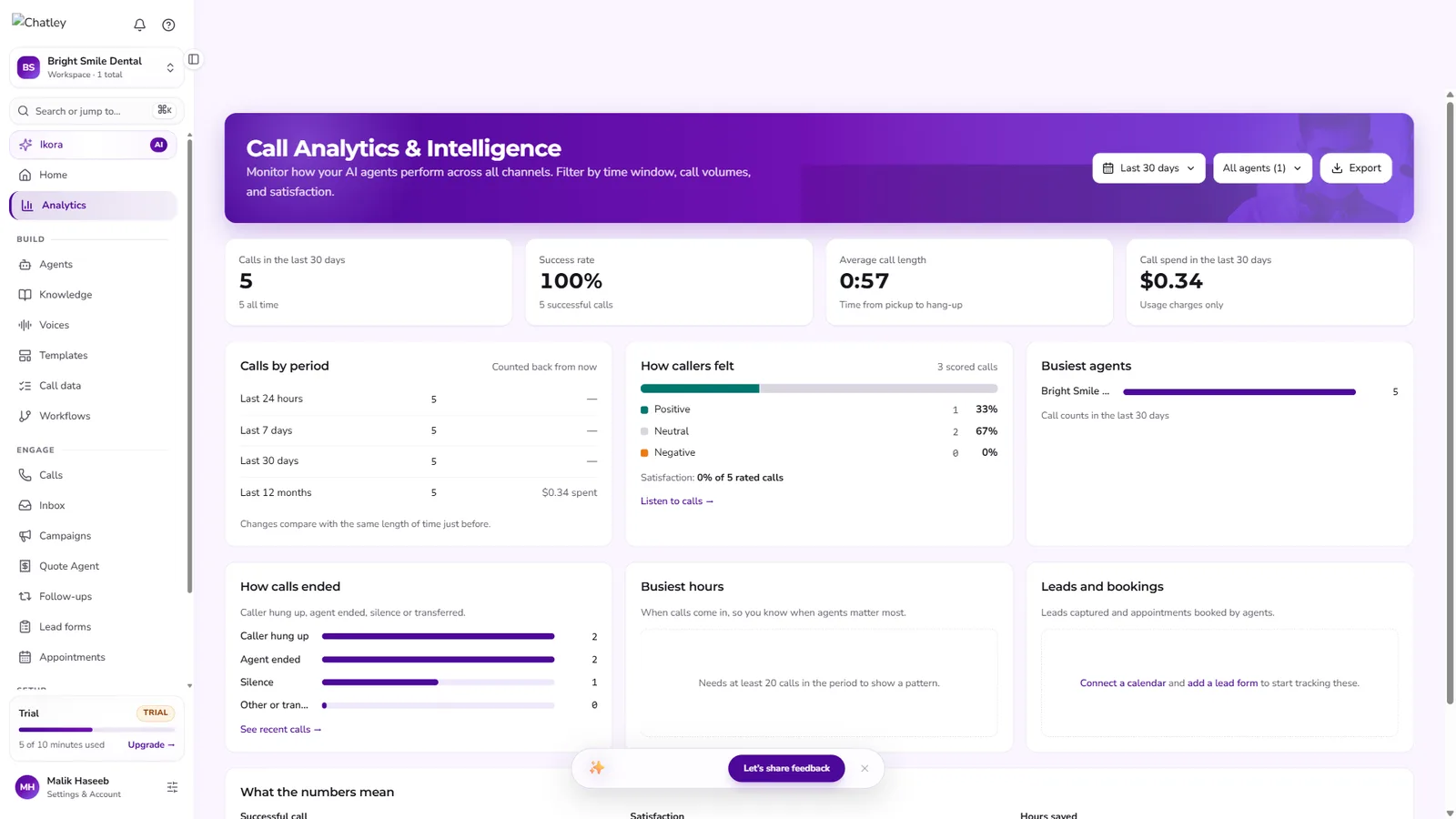
Every call is recorded, transcribed, scored for sentiment and risk, and rolled into analytics: success rate, call length, how calls ended and spend.
Can you build a voice agent for us?
Yes. This engine is the AIOBC Voice Agent. A pilot on one call flow, inbound or outbound, typically goes live in 2–4 weeks.
The call shown is a real test call on Chatley with a demo agent, edited for pace; the caller’s voice is AI-generated. Screens are from a demo workspace.